HOW TO CONNECT MY BANK ON ONLYFANS

Hey creators, we’re thrilled to have you on board! Today, we’ll walk you through how to link your bank on OnlyFans, whether you’re a subscriber or a creator.
Adding a bank account is a crucial step when using OnlyFans because without it, the platform won’t be of much use to you. You wont be able to sign up as a creator nor would you be able to pay and subscribe to other peoples content.
You might be thinking ‘But why wouldn’t be I able to add my bank?’ Well believe it or not, your residency plays a important role. Some countries are restricted on OnlyFans, and if you happen to live in one of them, you won’t be able to sign up as a creator or subscribe to others.
ADDING A BANK AS A SUBSCRIBER:
If you’re just setting up an account to subscribe to others, the process is pretty straightforward.
From Home go to More > Your Cards
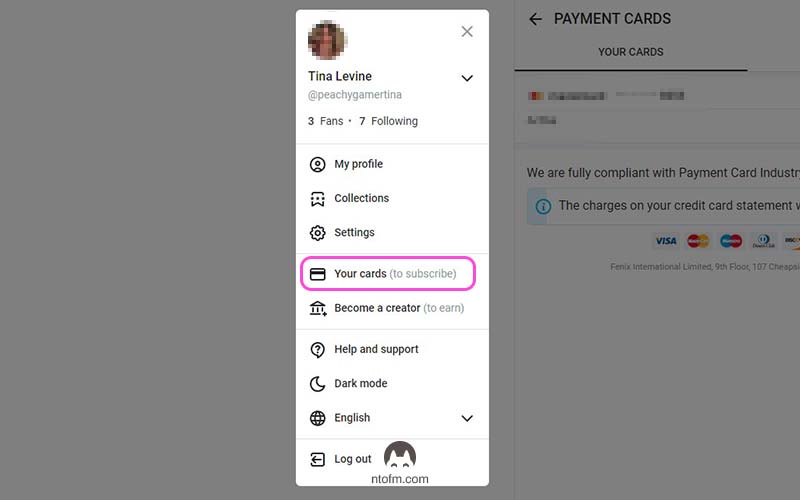
You get the following screen.
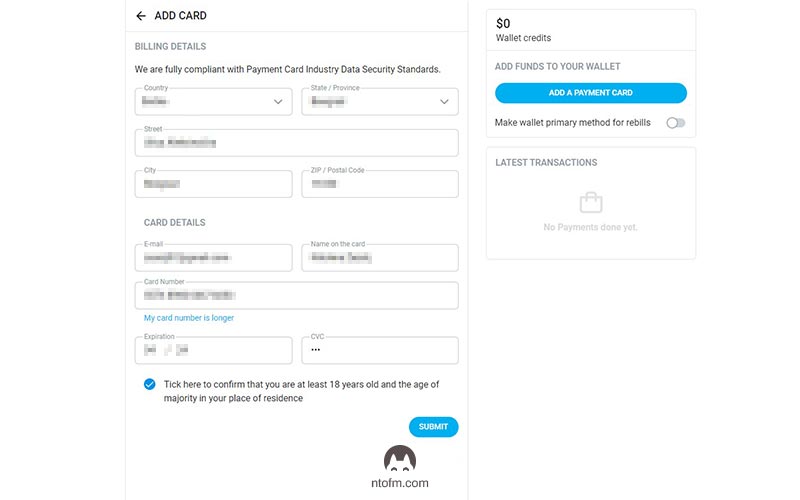
Fill in your data and click submit...


Comments
Post a Comment