
Hey there! Welcome to our blog. Let’s dive right in, shall we? You’re here to find out which countries are banned and which ones are allowed on OnlyFans. We’ll also be discussing where you can register as a creator and which places allow you to subscribe to others (Yes, there’s a difference!)
First, let’s clear up the difference:
Setting up an OnlyFans account leads you down two possible roads:
1. Become a content creator, earning cash through subscriptions or paid content.
2. Subscribe to other creators, gaining access to their exclusive content
You can choose one, or you can do both. No matter your choice, you’ll need to link a bank account or a credit card to get started.
Here’s where it can get a little complicated: The country you’re living in might limit your options.
Not all countries allow their residents to link their OnlyFans account, mainly due to the nature of some of the content on the platform. Some places put a limit on their people making money as creators on OnlyFans, especially if their content is adult in nature.
But when it comes to subscribing and paying for content, most countries are a lot more chill. So, while you might face restrictions in some places if you want to become a creator, you’ll probably find it smoother sailing if you’re just keen on subscribing.
That being said, you can create an OnlyFans account no matter where you are in the world. But if your country happens to be on the “no-go” list for either becoming a creator or subscribing, you won’t be able to link your card. This makes your account pretty much useless in both cases. You won’t be able to become a creator nor can you subscribe, tip, or buy any kind of content from anyone.
Here’s the list of countries in 2023 where OnlyFans is completely banned and you can’t access it: Dubai, Belarus, India, and Russia.
That wraps up everything about the card linking option. Now, let’s move on to the list.
We’ll start by looking at which countries allow you to become a creator on OnlyFans, and which ones don’t.
SUPPORTED COUNTRIES FOR CREATORS ON ONLYFANS LIST
Country’s in which you can make an Onlyfans account and start making money of of it:
Albania, Andorra, Anguilla, Antigua and Barbuda, Argentina, Australia, Austria, Barbados, Belgium, Bermuda, Bolivia, Brazil, British Virgin Islands, Bulgaria, Canada, Cayman Islands, Chile, Colombia, Costa Rica, Croatia, Cyprus, Czech Republic, Denmark, Dominican Republic, Ecuador, El Salvador, Estonia, Finland, France, Germany, Gibraltar, Greece, Guatemala, Honduras, Hong Kong, Hungary, Iceland, India, Indonesia, Ireland, Israel, Italy, Jamaica, Japan, Jersey, Kenya, Kosovo, Latvia, Liechtenstein, Lithuania, Luxembourg, Macedonia, Malaysia, Malta, Mexico, Moldova, Monaco, Montenegro, Morocco, Netherlands, New Zealand, Norway, Pakistan, Panama, Papua New Guinea, Paraguay, Peru, Poland, Portugal, Puerto Rico, Romania, Saint Kitts and Nevis, Saint Lucia, San Marino, Saudi Arabia, Serbia, Singapore, Slovakia, Slovenia, South Africa, South Korea, Spain, Sri Lanka, Sweden, Switzerland, Taiwan, Thailand, Trinidad and Tobago, Turkey, Turks and Caicos Islands, UAE, Ukraine, United Kingdom, Uruguay, US Virgin Islands, Venezuela, Vietnam
Total number: 106
BANNED COUNTRIES FOR CREATORS ON ONLYFANS LIST
Afghanistan, Algeria, Angola, Armenia, Azerbaijan, Bahamas, Bahrain, Bangladesh, Belarus, Belize, Benin, Bhutan, Bosnia and Herzegovina, Botswana, Brunei, Burkina Faso, Burundi, Cambodia, Cameroon, Cape Verde, Central African Republic, Chad, China, Comoros, Congo (DRC), Congo (Republic), Cuba, Djibouti, Egypt, Equatorial Guinea, Eritrea, Ethiopia, Fiji, Gabon, Gambia, Georgia, Ghana, Grenada, Guinea, Guinea-Bissau, Guyana, Haiti, Iran, Iraq, Ivory Coast, Jordan, Kazakhstan, Kiribati, Kuwait, Kyrgyzstan, Laos, Lebanon, Lesotho, Liberia, Libya, Madagascar, Malawi, Maldives, Mali, Marshall Islands, Mauritania, Mauritius, Micronesia, Mongolia, Mozambique, Myanmar, Namibia, Nauru, Nepal, Niger, Nigeria, North Korea, Oman, Palau, Palestine, Philippines, Qatar, Russia, Rwanda, Samoa, Senegal, Seychelles, Sierra Leone, Solomon Islands, Somalia, South Sudan, Sudan, Suriname, Swaziland, Syria, Tajikistan, Tanzania, Togo, Tonga, Tunisia, Turkmenistan, Tuvalu, Uganda, Uzbekistan, Vanuatu, Yemen, Zambia, Zimbabwe
Total number: 108
Next up, we have the full lists of countries where you are either banned or allowed to pay for subscriptions.
LIST OF AVAILABLE COUNTRIES FOR SUBSCRIBERS
Albania, Algeria, American Samoa, Andorra, Angola, Anguilla, Antigua and Barbuda, Argentina, Armenia, Aruba, Australia, Austria, Azerbaijan, Bahamas, Bahrain, Bangladesh, Barbados, Belgium, Belize, Benin, Bermuda, Bhutan, Bolivia, Bosnia, Botswana, Brazil, British Virgin Islands, Brunei, Bulgaria, Burkina Faso, Cambodia, Cameroon, Canada, Cape Verde, Cayman Islands, Chad, Chile, China, Christmas Island, Colombia, Comoros, Cook Islands, Costa Rica, Côte d’Ivoire, Croatia, Cyprus, Czech Republic, Denmark, Djibouti, Dominica, Dominican Republic, Ecuador, Egypt, El Salvador, Equatorial Guinea, Eritrea, Estonia, Ethiopia, Falkland Islands, Faroe Islands, Fiji, Finland, France, French Polynesia, Gabon, Gambia, Georgia, Germany, Ghana, Gibraltar, Greece, Greenland, Grenada, Guam, Guatemala, Guinea, Guinea Bissau, Guyana, Haiti, Honduras, Hong Kong, Hungary, Iceland, India, Indonesia, Ireland, Israel, Italy, Jamaica, Japan, Jersey, Jordan, Kazakhstan, Kenya, Kiribati, Kosovo, Kuwait, Kyrgyzstan, Laos, Latvia, Lesotho, Liberia, Liechtenstein, Lithuania, Luxembourg, Macao, Macedonia, Madagascar, Malawi, Malaysia, Maldives, Mali, Malta, Marshall Islands, Martinique, Mauritania, Mauritius, Mexico, Micronesia, Moldova, Monaco, Mongolia, Montenegro, Montserrat, Morocco, Mozambique, Myanmar, Namibia, Nauru, Nepal, Netherlands, Netherlands Antilles, New Zealand, Niger, Nigeria, Niue, Norfolk Island, Norway, Oman, Pakistan, Palau, Panama, Papua New Guinea, Paraguay, Peru, Philippines, Pitcairn Islands, Poland, Portugal, Puerto Rico, Qatar, Republic of the Congo, Romania, Rwanda, Saint Kitts and Nevis, Saint Lucia, Saint Pierre, Saint Vicent and the Grenadines, Samoa, San Marino, Sao Tomé and Príncipe, Saudi Arabia, Senegal, Serbia, Seychelles, Sierra Leone, Singapore, Slovakia, Slovenia, Solomon Islands, South Africa, South Georgia, South Korea, Spain, Sri Lanka, Suriname, Swaziland, Sweden, Switzerland, Taiwan, Tajikistan, Tanzania, Thailand, Tibet, Timor-Leste, Togo, Tonga, Trinidad and Tobago, Tunisia, Turkey, Turkmenistan, Turks and Caicos Islands, Tuvalu, UAE, Uganda, Ukraine, United Kingdom, United States of America, Uruguay, US Virgin Islands, Uzbekistan, Vanuatu, Vatican City, Vietnam, Wallis and Futuna, Zambia
Total number: 190
LIST OF BANNED COUNTRIES FOR SUBSCIBERS
Afghanistan, Belarus, Burundi, Central African Republic, Cuba, Democratic Republic of the Congo, Grenada, Iran, Iraq, Lebanon, Libya, Malawi, North Korea, Palestine, Russia, Saint Vincent and the Grenadines, Somalia, South Sudan, Sudan, Syria, Venezuela, Yemen, Zimbabwe
Total number: 23
HOW TO CONNECT MY BANK ON ONLYFANS
FOR SUBSCRIBERS:
If you’re just setting up an account to subscribe to others, the process is pretty straightforward.
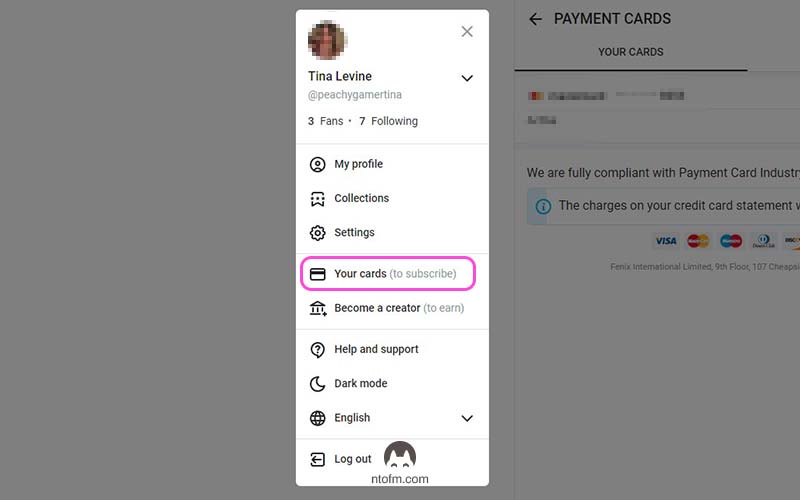
From Home go to More > Your Cards
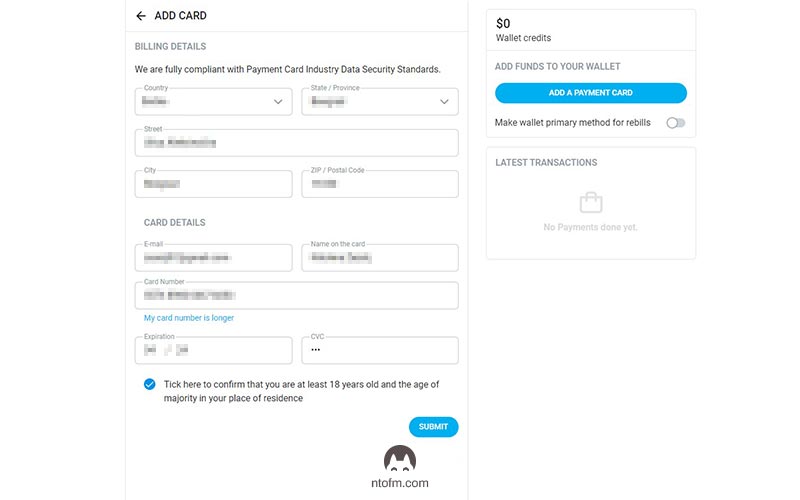
You get the following screen.
Fill in your data and click submit.
Just like that, you’ve successfully added a card to your OnlyFans account. Nice job!
You can add multiple cards by clicking on the ‘Add Card‘ button. And from the panel on the right, you can transfer money from your card to your onlyfans account, and that’s it.
When you link a card, OnlyFans will take out a small amount of 0.10$ from your balance, so make sure you’ve got enough funds to cover it.
FOR CREATORS:
Becoming a creator is a bit more complex and involves a few more steps, such as confirming your email, adding profile and cover photos, writing a bio, and completing the verification process.
We’ve put together a
detailed guide that takes you through how to create an OnlyFans account step by step where we break down everything you need to do before linking your bank. So, be sure to give it a look.
But once you’ve sorted all that out, the rest of the process is a piece of cake.
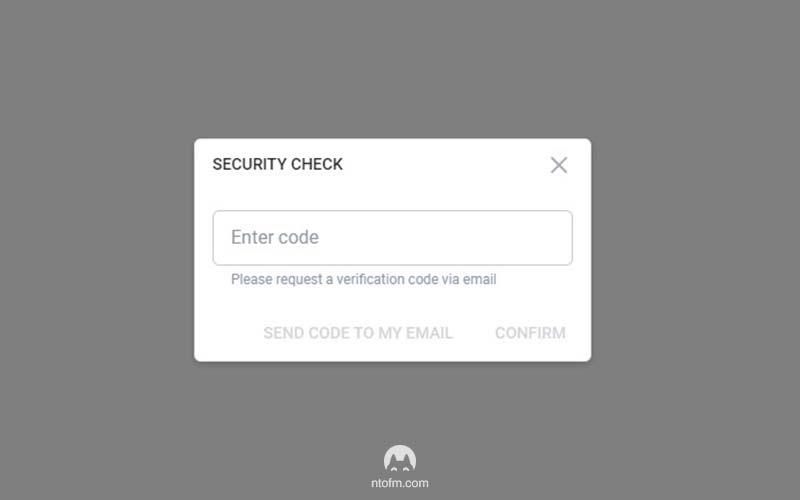
From More go to Bank (to earn). You’ll be asked to enter a code for a security check that you’ll receive on your mail, so do that. After you confirm your identity, you’ll reveal the banking page.
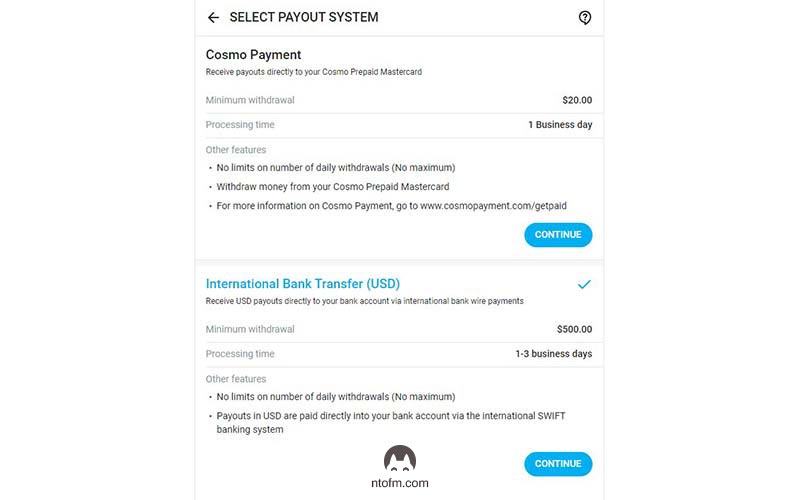
Depending on your country you’ll have the option to choose between multiple payout options like:
- Bank transfer ACH
- Direct transfer OCT
- International bank transfer SWIFT
- Visa Direct
- E-wallet
- International transfer SEPA
- Cosmo Payments
- Paxum
- or even some options that are exclusive just for your country
These are the options we have.
Now, select the bank one. For us, it’s “International Bank Transfer (USD)“. This will bring you to the next screen.
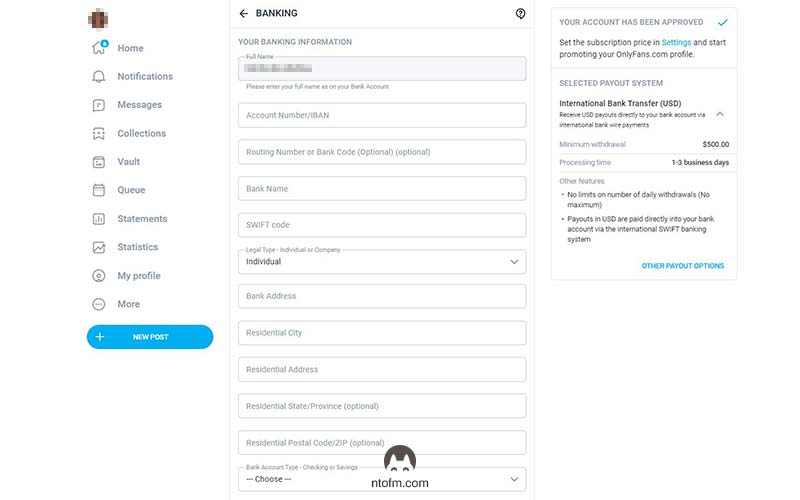
You’ll need to fill in all the fields, and we’ll explain one by one.
Full name: This should already be filled out from your verification process, and it can’t be changed.
Account number/IBAN: This is where you put in your personal IBAN number. You can usually find this in your bank contract, or on your bank’s online portal or app. Look in the settings or documents tab.
Routing Number or Bank Code: This field is optional. Each bank has its own unique code, which can vary in length from country to country. If you really want to know what it is, you can
visit this site. Choose your country and see where your bank code fits into your bank account number. Those are your bank’s digits.
For US citizens, you can find your bank routing number
here. These numbers are used by banks in the US for domestic payments. Each US bank has a specific 9-digit routing number based on the bank and its location. But as we said, if you’re unsure about your bank code or routing number, it’s best to leave it blank.
Bank name: Enter the full name of your bank here.
SWIFT Code: Like your IBAN, you can find your SWIFT code in your user agreement or on your bank’s online portal or app. Or you can use this
link to find your bank’s SWIFT code. It’s a good idea to
double-check this if you find it in both your user agreement and online.
Legal type – Individual or Company: If you’re opening an OnlyFans account as an individual and don’t own a company, tick the “Individual” box.
But if you do have a company and want to link your company’s bank details to your OnlyFans account, tick the “Company” box.
Please note: If you’re registering as a company, make sure all the other details like your IBAN and SWIFT code relate to your company bank account, not your personal one.
Bank Address: Enter your bank’s address here.
Residential Address: Put in the address associated with your bank account.
Residential State/Province: Input your state or province. This field is optional.
Residential Postal Code/ZIP: Same thing here.
Lastly, select your bank account type: checking or saving.
And that’s it! You now have something that looks like this.
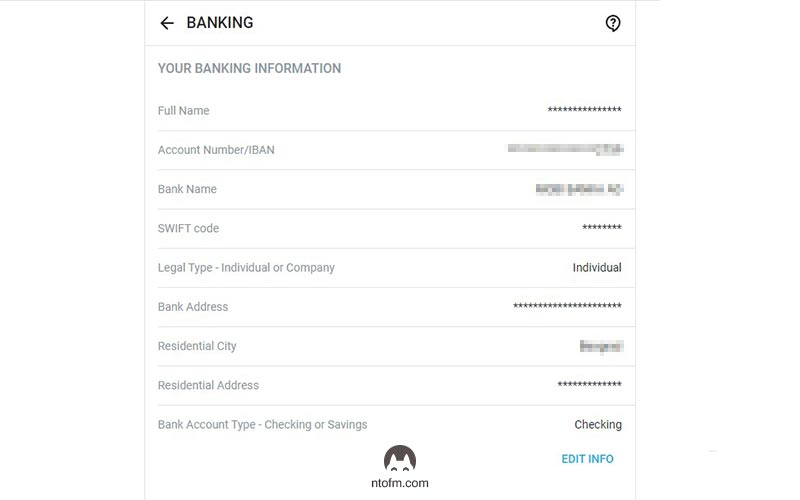
By following these steps, you have successfully linked your bank account to your OnlyFans profile. With this essential part out of the way, you are now ready to start creating content and earning money from your subscriptions and content sales!
Alright, so you’ve got the rundown on which countries say ‘yes’ and ‘no’ to OnlyFans, for both creators and subscribers. Now, you’re in a better spot to work your way around the platform.
The OnlyFans universe is super broad and diverse, and getting these basics down pat is your first move towards success. Speaking of it, if you wanna explore more? Check out our all-in-one guide, “
How to Start Your OnlyFans Journey in 2023“.
We truly hope you found this post helpful and informative. Here at
NekoTech, we’re all about giving
creators like you a boost. Just remember, the road to success on OnlyFans is more of a long run, not a quick dash. Take things slow, keep adding to your knowledge, and above all, don’t stop creating.
Feel free to hit us up if you have any questions or need a bit more help at contact@nekotechagency.com. Keep those creative juices flowing!
Here's how to get in touch with us ❤️:



Comments
Post a Comment